Joomla - Find out path of the current template
From php script use:
$path = $mainframe->getBasePath() ."templates/".$mainframe->getTemplate();
 |
This email address is being protected from spambots. You need JavaScript enabled to view it. |
From php script use:
$path = $mainframe->getBasePath() ."templates/".$mainframe->getTemplate();
If you don't use extensions that require mootools.js then deactivate mootools.js. In the index.php at top insert this code:
<?php
$headerstuff=$this->getHeadData();
reset($headerstuff['scripts']);
foreach($headerstuff['scripts'] as $key=>$value){
unset($headerstuff['scripts'][$key]);
}
$this->setHeadData($headerstuff);
?>
Module can be shown only in predefined positions of currently used template, e.g. left, right, top, footer, etc. Those predefined positions can be reveled if you reload your Joomla website and add ?tp=1 at end of URL (e.g. mysite.com/index.php?tp=1)
Sometimes there is a need to show modules inside article itself, e.g. you wish to include Social BookMark module in your article. So let's explain that:
Step1: in Extensions/Module manager edit module that you wish to show inside your article content
Step2: Create your own unique Position by manually entering custom name of the position (e.g. my_pos1) inside Position edit-box:
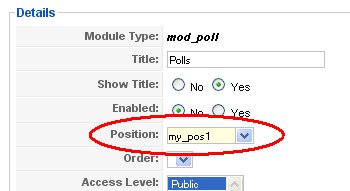
Step3: Go to Extensions/Plugin Manager and check that you have enabled plugin called Content - load module, change settings if you wish.
Step4: Write an article and at position where you want to put your module type: , in this case you will write . When article is shown instead of your module will be shown.
See more detailed descrption at JoomlaSpan.com
To customize module appearance, define own CSS class inside current template.css named with prefix: module + your own suffix. E.g.
.module_sheeponline
{
font-family:Georgia,century gothic, Arial, sans-serif;
font-size: 12px;
margin: 20px 14px 0px 14px;
background: #CC6A10;
border: 1px solid black;
text-align: center;
color:white;
}
Then go to the module that you wish to customize and apply stylesheet and in put your own class suffix (_sheeponline in this case) in the Module Class Suffix entry box:
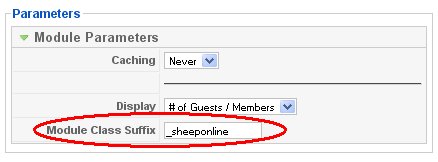
In this example I've change appearance of the default Who Is Online module. I was not happy with statement which begins as: "We Have # guests online", so I've changed this default text in languages/en-GB/en-GB.mod_whosonline.ini: WE HAVE= and GUEST=%s sheep, GUESTS=%s sheep's. End result is this:

Note: you can customize appearance of every module in Joomla
To change default pdf, e-mail and print icon in Joomla article layout, go to the Joomla installation sub directory find & replace these files:
/images/M_images/emailButton.png
/images/M_images/printButton.png
/images/M_images/pdf_button.png
Find icons at http://www.iconarchive.com or at www.iconfinder.net
Check mine icons:


I was trying to understand how to create own templates, but all I had is massive headache, it's so complicated, so I think that best way is to use existing template and to customize it. There is no guidelines on how to customize template. Three main files of the Joomla 1.5 template are index.php, /css/template.css and templateDetails.xml.
index.php determine main layout. template.css is used to define stylesheets. Stylesheets can be applied to the standard Joomla elements or to the custom defined elements/modules. To see element (module) position/name inside page layout, load page in your browser and View Source or invoke Joomla main page with ?tp=1 option (e.g. www.mysite.com/index.php?tp=1).
After you finish with your template, change templateDetails.xml to include all files that are needed for template deployment, because even if you zip whole template directory content, Joomla installation process will only install files that are declared inside this xml file.
With little knowledge of html, php and css you can reverse-engineer and customize any template in few hours/days, at least I did it.
I was able to redesign siteground-j15-84 template from SiteGround.com and to embed Nice Social BookMark module to appear at bottom of every article that had E-mail button icons enabled. Also I've changed position of the Print, Pdf and E-mail icon's from top-right to the bottom-right (see on my pages). Download my customized template Trumba Sundown.
To customize article layout's (re-arrange icons, move header, category descriptions, etc..) of single article:
1. Download and unzip Joomla installation on your local disk
2. In your main template directory create subfolder \html\com_content\article\
3. From joomla installation directory copy file components\com_content\views\article\tmpl\default.php to the \html\com_content\article\ subdirectory of your template
4. Edit default.php and change what ever you like (e.g. add some permanent footer that will be displayed on the bottom of every article):
at the end of the default.php search for </table> tag, before this tag insert your own html/php code or whatever you want. See my 'footer' code inside default.php (in bold):
<?php if ( intval($this->article->modified) !=0 && $this->params->get('show_modify_date')) : ?>
<tr>
<td class="modifydate">
<?php echo JText::sprintf('LAST_UPDATED2', JHTML::_('date', $this->article->modified, JText::_('DATE_FORMAT_LC2'))); ?>
</td>
</tr>
<?php endif; ?>
<!-- Trumba addd-on: place pdf, email, print + nice_social_bookmarks bottom-right, if enabled any, if email icon is disable, all nice_social_bookmarks are also disabled -->
<?php if ($this->params->get('show_pdf_icon') || $this->params->get('show_print_icon') || $this->params->get('show_email_icon')): ?>
<tr>
<td>
<table width="100%" class="share_this_table">
<tr>
<td width="100%">
</td>
<?php if ($this->params->get('show_pdf_icon')) : ?>
<td align="right" width="100%" class="buttonheading">
<?php echo JHTML::_('icon.pdf', $this->article, $this->params, $this->access); ?>
</td>
<?php endif; ?>
<?php if ( $this->params->get( 'show_print_icon' )) : ?>
<td align="right" width="100%" class="buttonheading">
<?php echo JHTML::_('icon.print_popup', $this->article, $this->params, $this->access); ?>
</td>
<?php endif; ?>
<?php if ($this->params->get('show_email_icon')) : ?>
<td align="right" width="100%" class="buttonheading"
<?php echo JHTML::_('icon.email', $this->article, $this->params, $this->access); ?>
</td>
<?php include $mainframe->getBasePath() ."templates/".$mainframe->getTemplate()."/social_bookmark.php"; ?>
<?php endif; ?>
</tr>
</table>
</td>
</tr>
<?php endif; ?>
<!-- end of part -->
</table>
<span class="article_separator"> </span>
<?php echo $this->article->event->afterDisplayContent; ?>
5. To change article appearance in the frontpage layout copy default_item.php from \components\com_content\views\frontpage\tmpl\ to the \html\com_content\frontpage\ subdirectory of your template. Change it and include it in your template.
6. To change article appearance in the category layout copy blog_item.php from \components\com_content\views\category\tmpl\ to the \html\com_content\category\ subdirectory of your template. Change it and include it in your template.
7. To change article appearance in the section layout copy blog_item.php from Joomla_1.5.15-Stable-Full_Package\components\com_content\views\section\tmpl\ to the \html\com_content\section\ subdirectory of your template. Change it and include it in your template.
5. After you made all changes, edit templateDetails.xml and declare every single file that is needed for template. Set descrption and author name.
6. Zip template directory with all files and try to install it from Joomla admin interface.
Joomla Template Tutorial at CompasDesign
Create basic template from Joomla.org
Official documentation about templates at Joomla.org
Try to create your own simple template using SiteGround tutorial on how to create basic 1.5 template
See list of all Joomla mini how to's from this site