I recently found fast, reliable, lightweight zip/unzip utility from http://www.info-zip.org/. I've use this tool extensively, and one of main reasons is that can handle files larger then 4Gb, which was main limitation of older zip tools (I think that zlib has this limitation). There are two executable's: zip and unzip. (use -h or -? to get help).
Goal: execute multiple dos bat scripts, each script can call any number of other programs and every script must break execution if error is detected after each step. For safety reasons each script must return non zero value if error detected (to enable error detection if bat script is executed from other program as separate process).
To check if error occured after execution of DOS command or after call of external program use this (tested on Windows XP):
IF %ERRORLEVEL% NEQ 0 GOTO ERROR_HANDLER
where ERROR_HANDLER is label (jump point) in your bat script which contains error handling part of code.
Complete example: copy N files from location A to the B and after each step check for error, if error occured print 'Error' otherwise 'Sucess'. Note: 'exit 1' will cause command prompt to close, to avoid this, remove command 'exit 1':
@ECHO OFF
REM COPY all
copy /Y D:\exe\appserver\release\appserver.exe" D:\AppServerDeploy IF %ERRORLEVEL% NEQ 0 GOTO ERROR_HANDLER
copy /Y "D:\exe\sokrates_spc\release\sokrates.exe" D:\SPCDeploy IF %ERRORLEVEL% NEQ 0 GOTO ERROR_HANDLER
copy /Y "D:\tool\AdminTool\release\db_actualize.dll" D:\SPCDeploy IF %ERRORLEVEL% NEQ 0 GOTO ERROR_HANDLER
If you need to rename/create file (backup) using date or time using DOS batch file, use variables %DATE% and %TIME%. Sometimes %DATE% variable returns short name of the day of week before actual date. (e.g. fri 11.06.2010.) To strip dayname part use substring: %DATE:~4,10% (from pos 4 takes 10 chars), so our date var will be now 10.06.2010. If you want to change dateformat then go to Control Panel/Regional Settings/Reginal options/Customize (Windows XP) and set desired date format.
My time format is HH:MM:SS,MS, because DOS doesn't not tolerate ":" and "," inside filename then it's needed to replace those char's. I've replaced them with "." and I don't neeed miliseconds, so result is: HH.MM.SS.
I'm using bat script to periodically backup content of the svn (subversion) into txt, zip file with current date (backup is executed once a day), then remove oriignal txt file:
svnadmin dump d:\svnrep > e:\svn_bcp\svnbcp_%date:~4,10%.txt zip -r svnbcp_%date:~4,10%.zipsvnbcp_%date:~4,10%.txt delsvnbcp_%date:~4,10%.txt
Note: zip.exe is custom windows-console utility that i use for zipping.
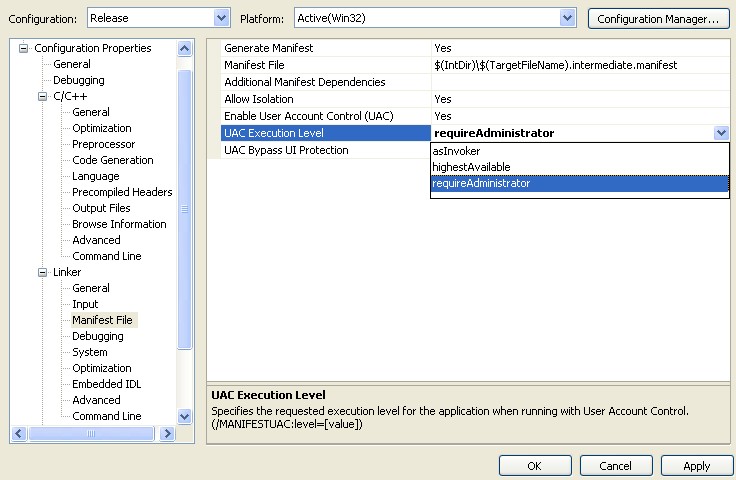
This is valid only for Visual Studio environment 2008 and later and for Windows systems that use UAC user access right control system (Vista, Windows 7).
Select project properties, (C++ Project), go to Linker/Manifest File and in UAC execution level choose 'requireAdministrator':
To redirect page on load to some other URL use meta directive 'Refresh' and content. First parameter defines delay in seconds before redirection (0 for instant redirection).