
Joomla - How to publish article without visible menu entry (hide from menus)
If you want to hide article from all visible menus or to move article to another menu and ensure that article is still reachable by old url path (to avoid 404 errors) you must create so called hidden menu module and copy article menu entriy to this hidden menu. In details:
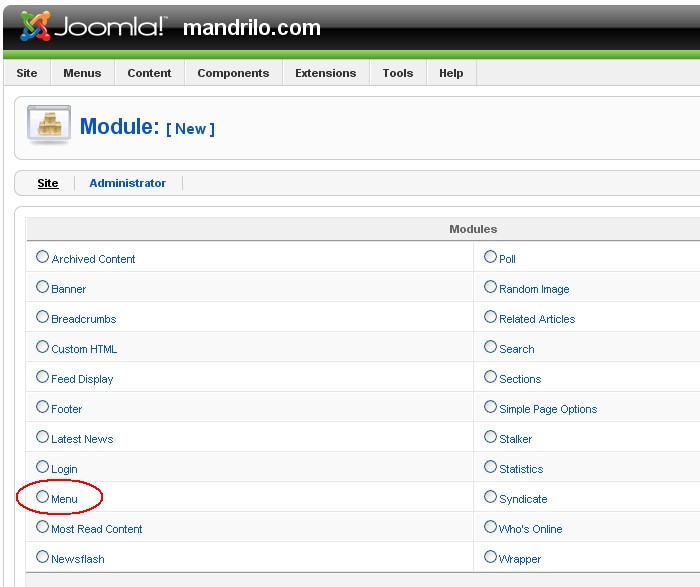
Step1: Let's assume that you have menu entry called "MyArticle" linked to article named "Lekcija1" with abosulute url path: http://mysite.com/lekcija1 and you wish to hide menu entry "MyArticle" but still want to make available article "Lekcija1" at url http://mysite.com/lekcija1. First step is to create so called hidden menu module. Go to Extensions/Module Manager and click on New to create new module. In following screen select module of 'Menu' type (see on picture):
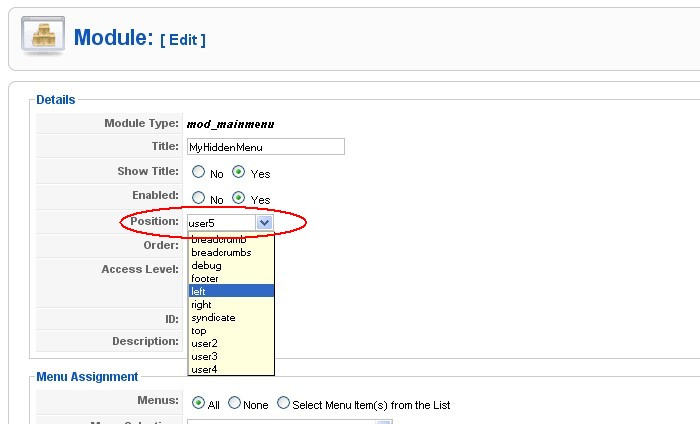
Step2: In next screen of the new module creation wizard set title of module. For this example module will be named "MyHiddenMenu". Most important thing is to set Position to non-existing module placeholder. List of available module placeholders is shown in drop down list. Manually write name of the new placeholder, let's say "user5". Placeholders are fixed places inside given template that will contain newly created modules (right and left menues, whos online module, newsflash, etc..). By setting module position to the non-existing placeholder module is automatically hidden although enabled. Warning: some templates can use placeholder named "user5" or "user6" so you can set the name in more unique fashion, let's say: "my_hidden_place"
Step3: In Menus/Menu Manager create new menu based on menu module "MyHiddenMenu". Module Title must be set as name of our hidden module="MyHiddenMenu". Rest of fields are not so important as menu will never be shown anywhere.

Step4: In Menus find "MyArticle" menu entry and copy it to the newly created menu "MyHiddenMenu". Afterwards you can delete "MyArticle" or unpublish it from old menu. That's it. Now old article should be reacheable by old url path without any menu entry visible. To create new 'hidden' article, just create article inside MyHiddenMenu menu.
