
Joomla - How to enable "Search engine friendly URL's"
Default Joomla installation uses hard to read 'encrypted' URL's like http://yourdomain.com/index.php?option=com_content&task=view&id=17&Itemid=26. Humans and search engines can have trouble to understand, analyze and memorize this kind of links. Joomla gives option to use so called SEF-s or Search Engine Friendly URL's like: http://yourdomain.com/section/category/article_name.html. To enable this kind of links, follow these steps:
Step 1: Login as Administrator. Go to menu Site/Global Configuration. Click on 'YES' checkbox near Search Engine Friendly URLS'. Save settings.
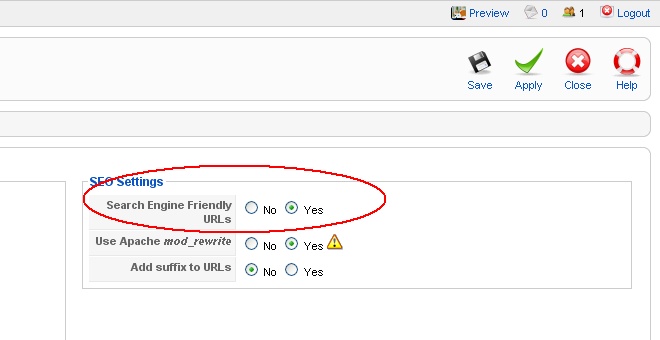
Step 2: Enable mod_rewrite for Apache server. Some web host providers are enabling this by default, if so then after step 1, just check if SEF URL links are working. If not then perform this step: log with your ftp client (or web File Manager) on your server and navigate to the Joomla installation directory (probably /public_html). Default Joomla installation leaves file htaccess.txt in root directory. Rename this file to .htaccess (no extension). This will enable mod_rewrite ("RewriteEngine On" command at start of this file). It's recommended that this file is always in use (renamed to .htaccess), because it contains some other security restriction which will help keep your Joomla site more secure.
Tutorial on SEF's on SiteGround